Setting a datum in a Well View
The Well View includes functionality for datuming using a marker or specified depth, to aid in reviewing your well and log data.
To apply a datum to the view:
- Click on the Datuming
 button in the Well View toolbar to open the Datum form.
 - Choose to datum on either a Marker or Depth.
If you choose Marker, select the marker set that contains the marker or markers you wish to datum on from the Marker set drop-down list, and then select the Primary marker you want to use and, if desired, secondary and tertiary markers.
If you select a Secondary marker, this will be used for the datuming of any well for which the primary marker is not present - it will be aligned with the same marker of the adjacent well. Similarly, if neither the primary nor secondary markers are present, any marker you specify in the Tertiary marker drop-down list will be used for datuming.
If you choose Depth, specify the projection depth. The depth projection used for the specified depth is the same depth projection as indicated in the Measure drop-down list.
Setting datum with TVT/TST projection
When you set a datum with TVT or TST projection, you can select only the Marker option, as these projections represent thickness measurements.
After you have selected a datum, the position of the wells in the Well View shifts to align with the datum. The TVT/TST thickness at datum is set to zero and the TVT/TST track axis shows the relative TVT/TST thickness with respect to the datum. On the contrary, datuming with conventional projection modes e.g. MD/TVD/TVDSS shifts the position of the wells in the Well View while keeping the depth values of the depth scale fixed.
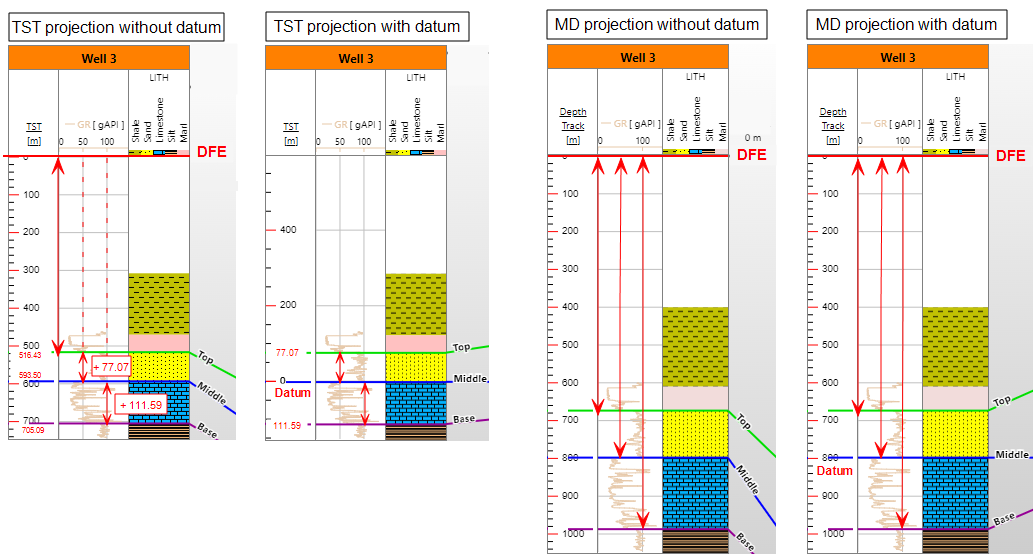
Difference between setting datum with TST and MD projection. The two left wells show TST projection without and with datum. The two right wells show MD projection without and with datum. The marker 'Middle' is set as datum for both projection types. For TST projection without datum, the measuring distance starts at Derrick Floor Elevation. The position of the markers is determined by adding the thickness of each subsequent zone. When you set a datum, the relative thickness of each zone stays the same but now the starting measuring point becomes the datum. The TST axis is adjusted to accommodate for this change. For the MD projection nothing changes regarding the starting measuring point (DFE). The depth axis stays the same. The only change is the position of the wells in the view, to align with the datum. click to enlarge
You use TVT/TST projection when a reservoir has a significant dip or the wells are highly deviated. In this way you can ensure that apparent thickness variations are removed. Setting datum with these projections helps to correlate wells, observe thickness variations and find the sedimentary depocentre of a reservoir, in a geologically meaningful way. You can also reconstruct the depositional history of a reservoir, by setting each geological event as datum, one at a time. A 'flatten top' event at zero datum represents the 'starting state of deposition'.